 Aadee
Remote monitoring software for Windows computers and servers.
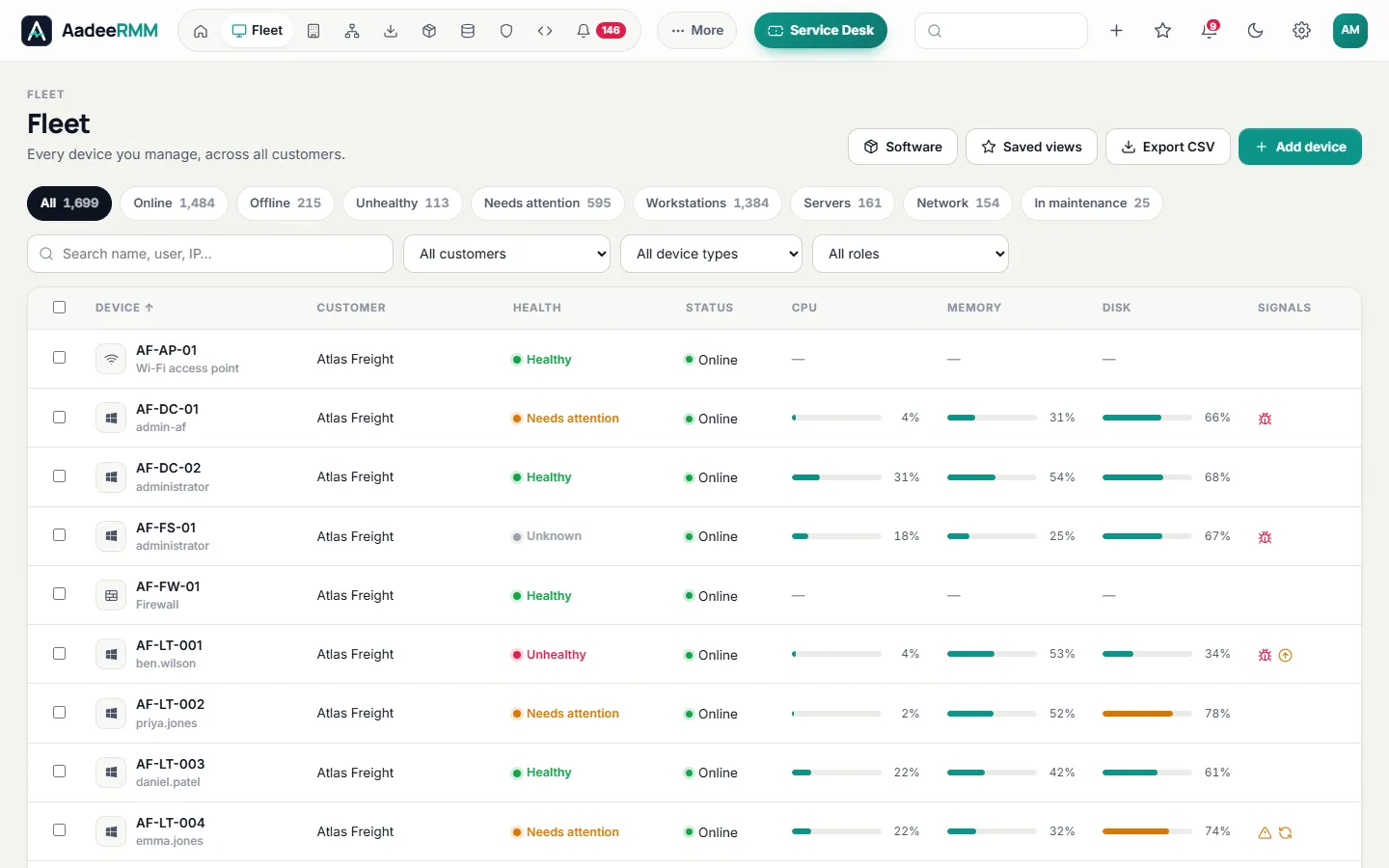
See the health of every computer you manage — for one company or hundreds of customers — and fix problems before anyone has to call you. One lightweight agent, one browser console.
What is remote monitoring?
Remote monitoring is the “RM” in RMM (remote monitoring and management). A small agent on each Windows computer and server reports its health to a central console: how busy it is, how full its disks are, whether its antivirus is working, whether it is still online. The console compares those readings with your rules and raises an alert the moment something needs attention.
With AadeeRMM, that console is in your browser and covers every customer you look after. You see problems before your users notice them, fix many of them automatically, and spend your day on planned work instead of firefighting.
Read our guide: What is RMM software? A plain-English guide.
Everything that keeps a computer healthy.
Starter alert rules are ready the moment a device appears. Adjust them for all customers or for one.
Performance and disk space
CPU, memory and disk usage on every device, with an alert before a disk fills up or a server struggles.
Offline devices
Know when a server or an important computer stops checking in, so an outage is never a surprise.
Security status
Microsoft Defender status and threats, BitLocker encryption, pending restarts and missing updates, side by side.
Windows event logs
Watch for the events that matter — disk errors, failed backups, services that crash — and raise an alert when they appear.
Websites and certificates
Check your customers' websites and get warned before an SSL certificate expires. Publish a branded status page if you like.
Network devices
Find switches, printers and firewalls with network discovery and watch them with ping and SNMP.
Problems that fix themselves.
Any alert rule can run a fix from your script library the moment it trips: clear temporary files when a disk fills up, restart a stopped service, and only bother a technician when the fix did not work.
See pricingAutomatic fixesAttach a script to an alert rule and it runs as soon as the alert opens (Professional plan).
Alerts where you workEmail, Microsoft Teams, Slack or webhooks — and push notifications in the technician phone app.
Maintenance modePause alerts for a device while you work on it, so nobody is woken for nothing.
Reports and security scoreDevice health, patch compliance and a security score per customer, as PDF or CSV, by email on a schedule.
Monitoring in three steps.
Sign up
Create your account and invite your technicians. The first 14 days are free, with every feature.
Install the agent
Run the signed installer, or deploy it with Group Policy using the one-line command from your console.
Watch and act
Devices appear in seconds with starter alert rules. Tune them, add automatic fixes and choose where alerts go.
Remote monitoring: questions, answered.
Which systems can AadeeRMM monitor?
Windows 10 and Windows 11 computers and current Windows Server versions (64-bit), and Linux computers and servers: Ubuntu, Debian, Red Hat Enterprise Linux, Rocky Linux, AlmaLinux and Fedora (x64 and ARM64). Network devices such as switches, printers and firewalls can be watched with ping and SNMP. macOS support is coming soon.
Does the agent slow computers down?
No. The agent is a small background service (a Windows service, or a systemd service on Linux) that only connects out over HTTPS to your AadeeRMM console — nothing listens on the computer — and it updates itself with signed updates.
Can I set different alert rules for different customers?
Yes. An alert rule applies to all your customers or to one, so each customer can have the thresholds that suit it.
Is monitoring included in every plan?
Yes. Monitoring, alerts and notifications are part of every plan. Automatic fixes, which run scripts, are part of the Professional plan. See pricing.
Where is monitoring data stored?
On servers in India operated by Aadee Infosys, with a standby server at a second location. Details are on our Security & compliance page.
One console for the whole job.
See every computer's health today.
Try every feature free for 14 days on up to 25 devices. No card, no commitment.
Questions first? Talk to us