 Aadee
Remote support software your users trust.
Start with a message, move to a call, share the screen only when it helps. Every step asks the user first — and every session is on the record.
Remote support, the respectful way
Remote support software lets a technician help someone at a distant computer: see the screen, take control, move files and run commands. Done badly, it feels like someone looking over your shoulder without asking.
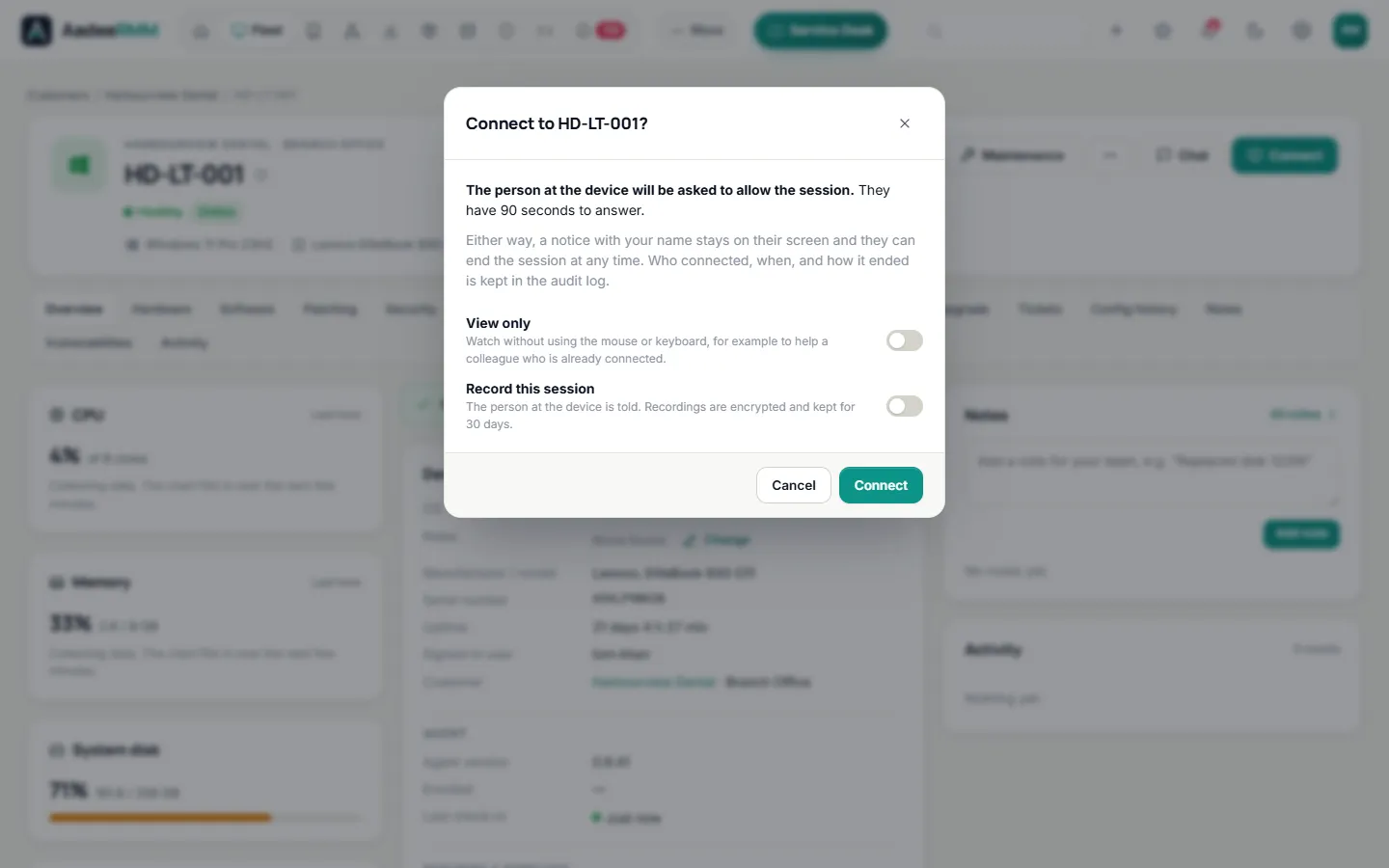
AadeeRMM is built the other way round. People are asked before anyone connects, always see who is connected, and can end the session themselves. Technicians get every tool they need, and every action is written to a tamper-evident audit log.
Read our guide: Remote support with user consent: a practical guide.
Help people the way they want to be helped.
Everything a technician needs, in the browser — no separate remote desktop tool to buy or install.
Remote access
See the screen and take control, including admin windows, UAC prompts and Ctrl+Alt+Del. View-only when you just need to look.
Chat
Message the person at the computer without taking over their screen.
Voice calls
Talk in the browser with clear, echo-free calls. Calls are never recorded.
File transfer
Drag and drop files and folders to and from the computer. Transfers are deleted from our servers once delivered.
Remote terminal
Open PowerShell or CMD on the computer without disturbing the user.
Professional planSession recording
Record a session when you need to — encrypted, and the user is told.
Professional planQuick Connect
Help a computer without an agent: the person types your 6-digit code at help.aadeermm.com and runs a small signed app that removes itself afterwards.
Professional planServers and sign-in screens
Connect to a server or a computer where nobody is signed in, when your settings allow it.
Technician phone app
Alerts, tickets and a timer on your phone, with push notifications.
The user stays in control.
For each customer you choose whether workstations and servers ask for permission before a session. Chats and calls always need the user's consent.
See pricingPermission promptsA popup asks the user before a session, chat or call starts.
A visible noticeWhile someone is connected, the user sees a notice with the engineer's name.
An End buttonOnly the user can press it, and it ends the session at once.
Everything on the recordSessions, terminal commands, file transfers and chat lines go into a tamper-evident audit log.
Support in three steps.
Install the agent
Run the signed installer on the computers you manage — or use Quick Connect for one-off help.
Choose your rules
Decide per customer whether workstations and servers ask the user for permission first.
Help in seconds
Open a device in the console and start a chat, a call, a session, a file transfer or a terminal.
Remote support: questions, answered.
Do the people I help need to install anything?
Computers you manage have the AadeeRMM agent. For anyone else, Quick Connect needs only a small signed app that the person runs once and that removes itself afterwards.
Can I connect to unattended computers and servers?
Yes, if your settings for that customer allow it. Even then, anyone at the computer sees a notice with the engineer's name while the session is open, and every session is in the audit log.
Are sessions recorded?
Only when a technician chooses to record one, and the user is told. Recordings are encrypted and deleted after your retention period (30 days by default). Voice calls are never recorded.
Is it secure?
The agent only connects out over HTTPS, so no ports are opened on the computer. Every technician signs in with two-factor authentication, and every action is audited. See Security & compliance.
Can I support Linux computers?
Yes, with the remote terminal. It opens the computer’s own login prompt, so you sign in with an account on that computer, and AadeeRMM asks for a fresh two-factor code first. Screen sharing and chat on Linux are not available yet.
Which plan includes remote support?
Remote access, chat, voice calls and file transfer are in every plan. The remote terminal, session recording and Quick Connect are part of the Professional plan. See pricing.
One console for the whole job.
Help your users the way they'd like.
Try every feature free for 14 days on up to 25 devices. No card, no commitment.
Questions first? Talk to us